A formidable and free download manager

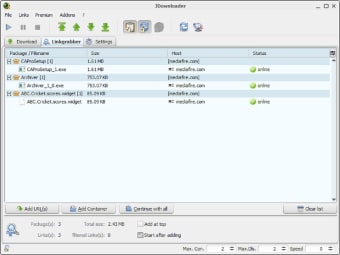
JDownloader is a free download management tool that allows you to download files from hosting services such as Mediafire, the accessible 4Shared, and other similar functionality hosting services quickly. File hosting services often gatekeep your full download speed to incentivize purchasing premium packages, this program helps circumvent that. 

Being an open-source platform, JDownloader features the ability initiate, halt, or pause downloads according to the user’s preference. It also has an auto-extract feature for archives, simplifying the process of retrieving content from compressed files. Moreover, this tool stands above the rest with its efficient management of small or large file downloads. 

What can you do with JDownloader? 

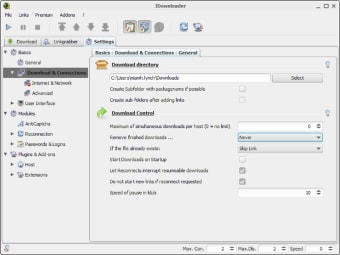
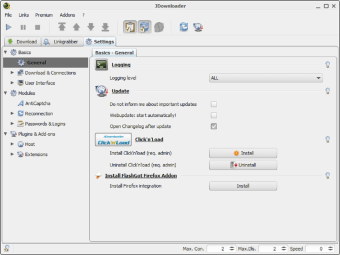
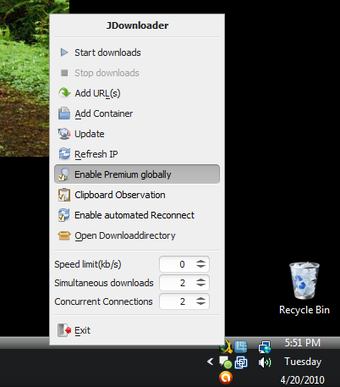
JDownloader, like many download managers, enables you to take control of the content you’re downloading online without having to rely on file hosting services. The downloader allows you to start, stop, and pause downloads, allocate bandwidth limitations, and auto-extract archives, among other more advanced functions. These handy functions provide an immediate solution to the problems associated with file hosting systems. While this tool remains great, JDownloader 2 was introduced with newer functions and regular updates

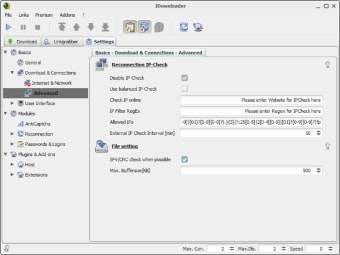
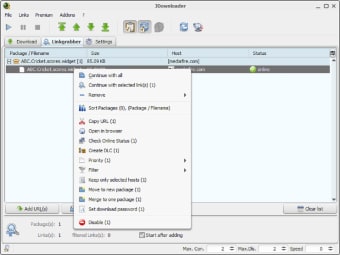
Once opened, you can use the software to manage any online download. You can then pause each download, specify the download order, download multiple files simultaneously, and even automatically overcome CAPTCHA requests. Similarly, users can also request a new IP address to overcome download limits from other file hosts. In addition, the software operates on open source, which means anyone can view the code and files behind the program. 

A few caveats for its advantages 

Keep in mind that the software may be flagged as an unwanted program, though, or you may be given a security risk depending on if and what anti-virus software you have downloaded. This is because this Internet download manager contains adware, a method that enables the software to remain free to use. The robust suite of features can also seem intimidating to new users especially due to the program not having user tutorials and tips. 

When mastered, JDownloader can be a formidable downloader. This being an open-source program means users are open to see its code. Some users have also developed and shared ways to better their in-app experiences by manipulating the code such as applying IntelliJ, updating the Eclipse IDE to a better functioning program with new features for users to enjoy. However, learning how to do this and installing it can be daunting as it requires personal research and application. 

Manage your downloads efficiently

JDownloader sets out to provide a specific service and it does it well. Managing all downloads from one source and having control over various elements around them gives you the freedom to optimize how to use your bandwidth best. Looking past the UI is the best way to see how this software works and the power it can give you to download files at your current download speed.

  • Pros

    • Quickly and efficiently download files from file hosting services
    • Download files simultaneously
    • Provides new and fresh IP address
    • Open source
    • User-shared files to improve the overall program
  • Cons

    • Paused downloads may crash upon restart
    • Intimidating UI for beginners
    • Modifying the program can be daunting
 0/6

App specs

  • License

    Free

  • Version

    48254

  • Latest update

  • Platform

    Windows

  • OS

    Windows 2000

  • Language

    English

    Available languages

    • Arabic
    • Czech
    • Danish
    • German
    • Greek
    • English
    • Spanish
    • French
    • Italian
    • Japanese
    • Dutch
    • Polish
    • Portuguese
    • Russian
    • Turkish
    • Chinese
  • Downloads

    2.9M

    Last month's downloads

    • 1.7K
  • Developer

Program available in other languages


User reviews about JDownloader

3.9

20 reviews

Add review

Main reviews for you

  • Anonymous user

    ADWARE/Adware.Gen!!!. The best downloader there is but unfortunately now crippled with spyware/adware. DO NOT INSTALL! Avira quarantined the adware files but until the authors of jdownloader either start charging for a paid version or get rid of the adware and make it truly free I cannot recommend. Paid for Internet Download Manager instead.


  • Anonymous user

    JDownloader, the most updated - best file hosting download manager. Great software, knows what to do with every file hosting server. Also extracts vids from youtube address, and download straight http and ftp.Asks for captchas in some cases, but you can use tools like Remote Captcha for iPhone so you don't have to be in front of the computer to enter them (captchas arrive to your iPhone and you can solve them right there!) Pros: - Very frequently updated- Very popular- Works with captcha Plugins like Remote Captcha for iPhone Cons: - Can use a lot of memory

  • Anonymous user

    Best Downloader (No adware or spyware). Jdownloader doesn't contain adware or spyware, lid.inbox simply forgot to uncheck the option to install toolbar.Best downloader there is , soon to be even better when the next major upgrade is released next month.

  • Anonymous user

    Try Pyload it's light and new and has a very nice interface.. Jdownloader is good but old fashionned and very heavy as it works on Java, try and discover the new Pyload and you will see a much better an very light software. It replaced easily jdownloader on my PC.

  • Anonymous user

    Jdownloader -the Best Downloader. I have been using jdownloader for 1.5 yrs and it has always fabulated me with its performance and perfection. Even the popular IDM is also no match for it..those who require real time downloading experience please always prefer jdownloader..

  • Anonymous user

    JDownloader - The Best! . I found out about the program through a friend and let me tell you that there is nothing like it. I'm not too sure if there are other such programs out there that offer the same value (i used other download managers, but truthfully there's no comparison) for users who use filesharing sites such as megaupload, rapidshare etc. I am a free user and all I have to do is Ctrl+C the links while jDownloader is open and Voila! the links have all been recognised and I just have to start the package. Verification, and subsequent link downloads and extraction is all taken care of. Seriously, the best! Cons: NONE

More

You may also like

Alternatives to JDownloader

Explore Apps

Related Articles

Latest articles

Laws concerning the use of this software vary from country to country. We do not encourage or condone the use of this program if it is in violation of these laws.
Softonic

Is JDownloader safe?

100/100

Score result: Clean

This file passed a comprehensive security scan using VirusTotal technology. It is safe to download.

  • Virus free
  • Spyware free
  • Malware free
  • Verified by Security Partners

    VirusTotal logo

Scan Info

Last scan
Tuesday, September 20, 2022
Scan provider
VirusTotal

Softonic security commitment

JDownloader has been thoroughly scanned by our advanced security systems and verified by industry-leading partners. This file comes from the official developer and has passed all our security checks, showing no signs of viruses, malware, or spyware.